Introduction

The Available to Promise (ATP) Module: Your Smart Assistant in Inventory Management and Customer Satisfaction
In a dynamic sales environment, it is crucial to have an accurate insight into the available inventory and delivery capacity. Our Available to Promise (ATP) Module meets this need optimally with an intelligent algorithm that evaluates and allocates available stock to order lines, and if necessary, recalculate new delivery dates in the absence of stock.
Key features and benefits include:
- Intelligent Inventory Allocation: The algorithm analyzes the current stock and determines which order lines can be fulfilled, ensuring an optimal allocation of available inventory.
- Automatic Delivery Date Recalculation: In case of no stock, a new delivery date is calculated and communicated to the customer through a Promised Not Available (PNA) message, listing the new delivery dates per order line.
- Comprehensive Component Monitoring: Takes into account a wide range of variables such as all sales orders, reservations, available stock per warehouse, customer and warehouse opening hours, purchase order lines, supplier delivery times, and any holidays or weekends.
- Seamless Integration with Other Modules: Works efficiently in conjunction with the Shipping module, and Order Picking List plugin and can be scheduled as a task via the Batch Module of Uniconta Nederland.
- Real-time Updates and Communication: Provides real-time updates on stock status and delivery dates, and automatically sends messages to customers about changes in the delivery date, contributing to improved customer satisfaction.
The Available to Promise (ATP) Module is a powerful extension to your inventory management and order processing system, aiming to maximize efficiency and customer satisfaction through accurate and timely communication about delivery dates. Discover how the ATP Module can optimize your sales, inventory, and delivery processes, and offer superior service to your customers.
Where to find?
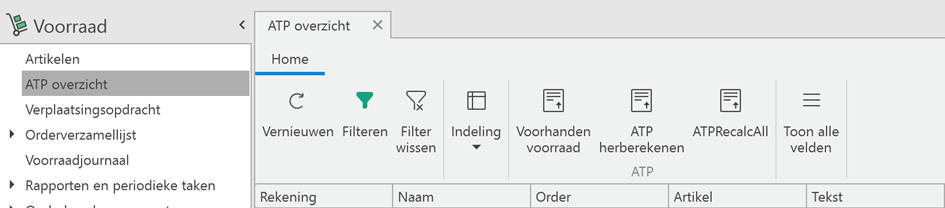
To find the overview in Uniconta go to the ‘Inventory’ tab, here you can find the ‘ATP overview’ module.
What to do with this module?
This module helps the user determine the right delivery date to promise to the customer. By calculating the number of products in stock and the amount of stock that is on its way to the warehouse, the module can give the user a good overview of available stock and the first possible delivery date. It calculates every morning and goes by all orders to see if the promised date is still possible. If not, it will give a PNA notification (Promise Not Available).
What it does
Every morning (by default, can be changed) it will go through all sales orders to see which products are in stock so that they can be assigned to these orders. It can also assign incoming products, which are not in the warehouse yet but there are purchase orders for them. It will start with the product with the earliest creation date (by default, could also use the earliest delivery date) and will continue until all orders are processed. If an order is partially in stock or even if an order line is partially in stock, it can split the order (if the customer wishes to). If an order cannot be delivered in time, the system will give a PNA (Promise Not Available) notification.
Available to promise parameters
For a customer, there are 2 possible parameters to set regarding the ATP module.
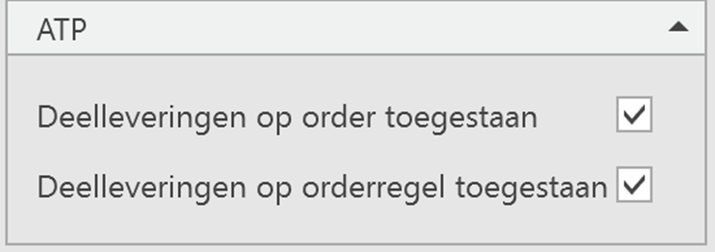
Partial delivery on order level
This enables the module to split orders if one ordered product is in stock but another ordered product is not. If this is the case it will tell the system that the available products can be delivered in partial shipments to the customer.
Partial delivery on order line level
This enables the module to split order lines, which means that the quantity of one single product can be split in two (or more) order lines. If for example of one product there are 2 items in stock but the order needs 4 the system can split it into two order lines. That way the first 2 items can be delivered to the customer while the remaining 2 items can be delivered when they are back in stock.
Both parameters can be adjusted per customer based on their preferences.
But these parameters can also be adjusted for a single order if the customer wants to deviate from their standard preferences.
On the order level, the user can also choose to check or uncheck the option if the order needs to be included in the ATP calculation. This box is checked by default.
Next to these parameters, also the desired delivery date can be denoted in the order. If the user has the Shipment module this will be calculated by the module, otherwise, it will be based on the purchase order.

Warehouses
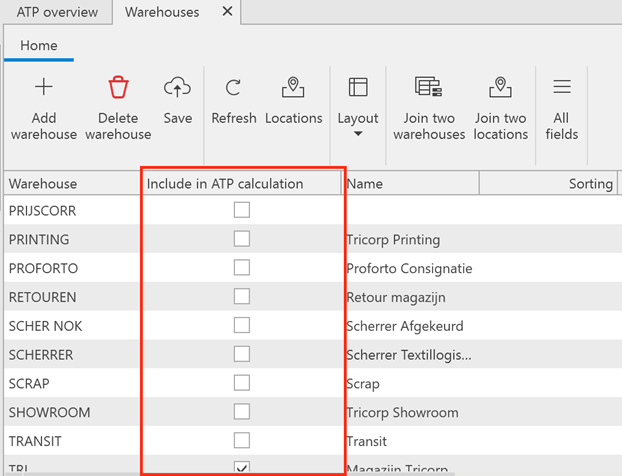
Under the tab ‘Inventory’ – ‘Maintenance’ – ‘Warehouses’ the user can determine for every warehouse if it has to be included in the ATP calculation. This can be useful when the user has for example virtual warehouses etc., these can be filtered out due to this option.
Stock management
In a sales order, the user can find the column called ‘stock management’. This column shows per order line the status, there are 3 possible options:
- None: Nothing happens with the stock
- Reserved: Economic stock will be decreased but physical stock will still be the same.
- Movement: Physical stock will be decreased.
The algorithm that is performed every morning will process all the order lines and give them the right status.
The effect of status can be seen in the pictures beneath:
None: The orderline does not affect the on-hand stock.
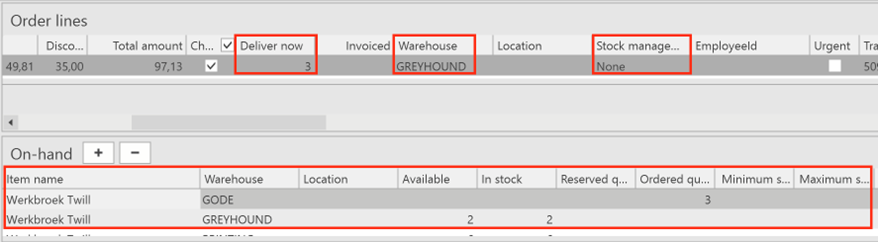
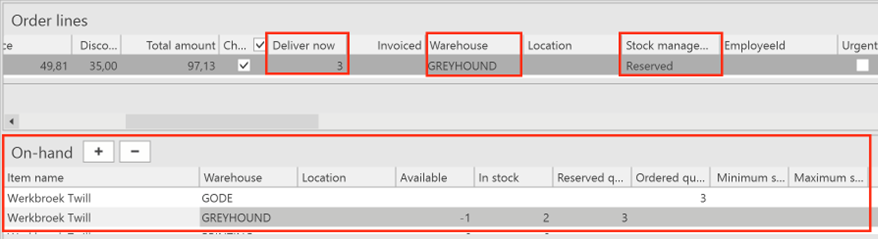
Reserved: The orderline is at the reserved quantity, available stock goes to -1 because no other orderlines can be assigned to this stock. There are still 2 items in stock because physically they didn’t move.
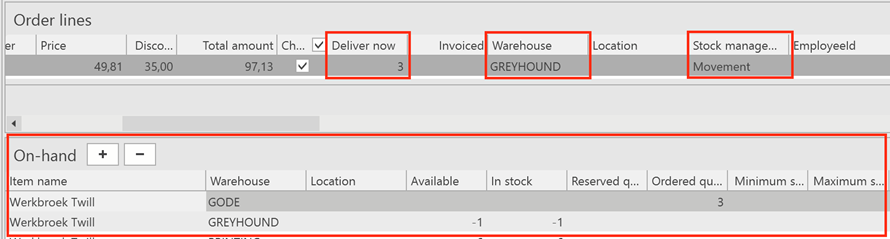
Movement: The items of the order line are moved to the customer, so they are physically and economically not in stock anymore.
ATP Overview
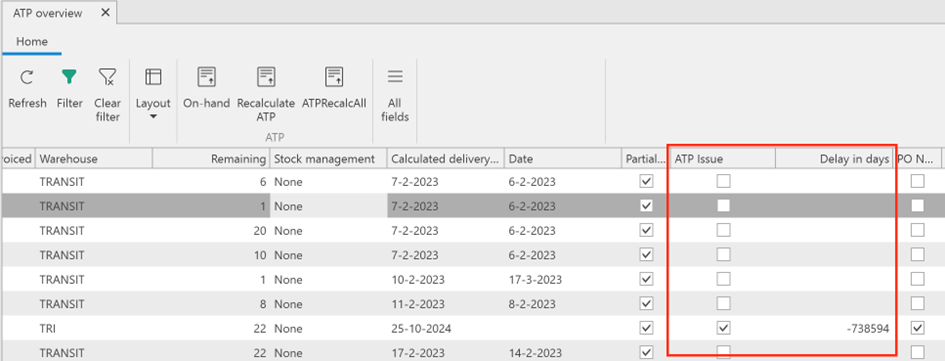
The ATP overview shows all the order lines that still need to be delivered in the system. The system prioritizes the oldest orders by default, from there on the system looks to the orderliness if they can be reserved. This algorithm is executed every morning by default but can be done manually by pressing the ‘Recalculate ATP’ button.
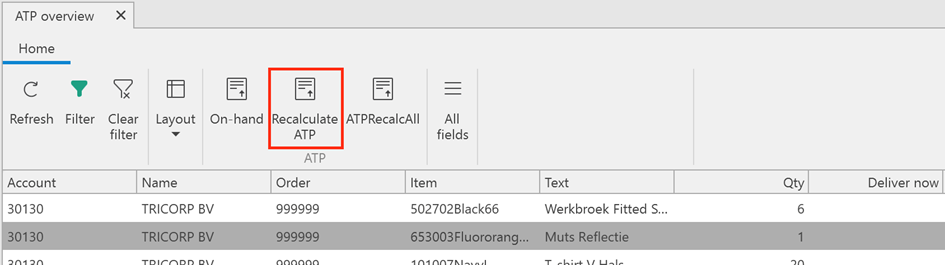
If there is an issue regarding the ATP the column ‘ATP Issue’ will be checked. The delay in days can then be found in the column ‘Delay in days’